Wild Wall 3D Mug Prints: Essential Setup and Usage Guide
If you are looking to create professional-grade custom mugs, Wild Wall 3D Mug Prints offers a high-quality starting point for your sublimation projects. However, the difference between a stunning finished product and a wasted investment often comes down to preparation rather than the design file itself. This resource provides optimized templates that can elevate your work, but it is not a standalone solution. To get the best results, you must understand the underlying technology of sublimation printing before you even attempt to open the files.
Many creators jump straight into purchasing digital assets without verifying their technical setup. This oversight frequently leads to frustration when the final print looks faded, misaligned, or pixelated. The Wild Wall 3D Mug Prints package is designed for users who already possess the necessary hardware and software. It is crucial to recognize that this download does not include instructions on how to operate a heat press or configure printing software. Your success depends entirely on your existing knowledge base and equipment readiness.
Understanding the Prerequisites for Success
Before downloading or using these templates, you need to ensure you have the correct tools in place. Sublimation is a specific process where solid dye turns into gas under heat and pressure, bonding with polymer-coated surfaces. If you lack the right printer, ink, or transfer paper, no amount of high-resolution artwork will save the project. Similarly, having the wrong type of mug—such as one without a polyester coating—will result in the ink washing off immediately.
Common Pitfall: Assuming that standard inkjet printers and regular photo paper will work for sublimation.
The Correction: You must use dedicated sublimation ink, sublimation-specific paper, and a printer capable of handling these materials. Without these, the transfer will fail regardless of the image quality.
Additionally, the software you use to manipulate the images matters significantly. The included files are PNG templates, which means they require an image editing program like Adobe Photoshop, GIMP, or Canva Pro to add your text, logos, or personal touches. If you try to apply the design directly from a basic image viewer without checking alignment, you risk ruining the wrap around the curve of the mug.
Why File Specifications Matter
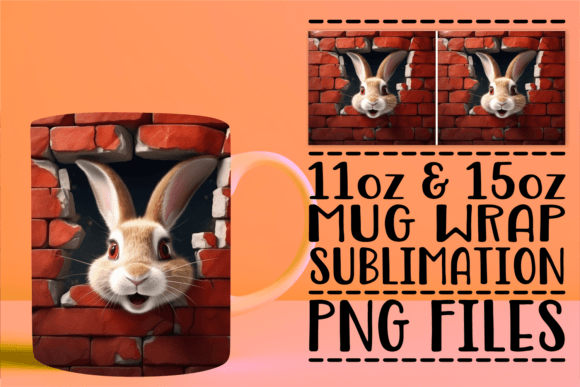
The Wild Wall 3D Mug Prints package includes two distinct PNG files optimized for 11oz and 15oz sublimation mug wraps. These files are rendered at an impressive 300 DPI (dots per inch), which is the industry standard for sharp, clear prints. High resolution ensures that the "3D" effect in the wall design remains crisp and does not appear blurry or jagged after the heat transfer process.
However, simply having a 300 DPI file is not enough. You must also ensure your software is set to the correct color mode. Most sublimation printers require CMYK or RGB settings depending on the specific workflow, but the most critical factor is mirroring the image. A frequent mistake among beginners is forgetting to flip the design horizontally before printing. When applied to a cylindrical object, a non-mirrored image will appear backwards once wrapped around the mug.
Navigating Common Mistakes and Misunderstandings
Even experienced makers sometimes overlook specific details that can compromise the final presentation. One of the most common errors involves sizing. While the files are sized specifically for 11oz and 15oz mugs, not all manufacturers produce mugs with identical dimensions. Some "15oz" mugs might be slightly taller or wider than others. If you do not measure your specific blank mug, the design might end up too small, leaving large white gaps, or too large, causing the edges to overlap awkwardly.
Real-World Example: A seller purchased the template for a 15oz mug but used a generic setting that assumed standard dimensions. Their resulting mugs had the "Wild Wall" graphic cut off at the top, requiring them to reprint and waste valuable time and money.
Better Approach: Always take physical measurements of your blanks and adjust the canvas size in your editing software if necessary to ensure the wrap fits perfectly.
Another area where users often struggle is the assumption that the file includes instructional guidance on the printing process. As noted in the product details, support is exclusively available for issues related to the files themselves. This means if you encounter problems with your heat press temperature, dwell time, or pressure settings, you will not receive troubleshooting help for those mechanical aspects. This limitation is important to accept before making a purchase.
Evaluating Usability and Efficiency
To maximize efficiency, you should treat these PNG templates as a foundation rather than a complete kit. They are highly customizable, allowing you to layer elements to meet specific client requirements. For instance, a small business owner might want to add their own logo above the 3D wall graphic. Because the files are high-resolution, you can scale your additional elements without losing quality.
However, adding too much text or complex graphics can clutter the design and reduce the impact of the original 3D effect. It is better to keep the layout clean and let the "Wild Wall" imagery stand out. Overcrowding the mug wrap can make the product look amateurish, potentially affecting customer satisfaction and repeat sales.
Making the Right Decision Before You Buy
When evaluating whether to acquire Wild Wall 3D Mug Prints, consider your current skill level and inventory. If you are just starting out and do not yet own a sublimation printer, heat press, or compatible blanks, this file will not solve your immediate needs. You would be better served by first investing in the hardware and learning the basics of the process.
Conversely, if you are a seasoned creator looking to expand your product line with high-quality, ready-to-use designs, this is an excellent resource. The inclusion of both 11oz and 15oz options adds versatility, allowing you to cater to different customer preferences without needing to source multiple files. The 300 DPI quality ensures that your products look premium, which is essential for competing in the crowded market of personalized gifts.
Checklist Before Downloading:
- Do you have a sublimation printer and appropriate ink?
- Do you own a heat press capable of reaching the required temperatures?
- Do you have a supply of polyester-coated mugs in 11oz and 15oz sizes?
- Are you familiar with image editing software to customize the PNGs?
- Have you verified that your workflow includes mirroring the image before printing?
If you can answer "yes" to these questions, you are well-positioned to utilize the Wild Wall 3D Mug Prints effectively. Remember that the goal is to create a seamless, professional-looking product that stands out. By avoiding common pitfalls like incorrect sizing, failure to mirror, or mismatched equipment, you can ensure a smooth production process.
In summary, while the Wild Wall 3D Mug Prints provide a fantastic visual asset, they rely on your expertise to bring them to life. Treat the files as a tool in your workshop, not a magic wand. With the right preparation, careful attention to detail, and a focus on quality control, you can produce beautiful mugs that delight customers and enhance your brand reputation. Should you encounter any specific issues regarding the file structure or download, feel free to reach out, as assistance is available for those particular challenges.